New this fall — our collection has grown to 60+ templates. Browse them all
Tropic Arts
  • Templates
  • Platform
    Platform overview →

    Build

    AI website builderDescribe your business and get the whole site written, on a template or a custom design.AI logo designerThree logo directions from a short chat, with a dark version and a favicon.Website templatesDesigner templates made in-house, each one built for a kind of business.Visual editorChange any word on the page, drag sections into order, and recolor in a click.Brand & styleBrand colors and fonts you choose on every page, and your logo on every email.

    Grow

    Online storeStore planProducts and inventory, discount codes, Stripe checkout, shipping, pickup and sales tax.Digital productsStore planDownloads and license keys, delivered the moment a payment clears.SubscriptionsStore planMemberships and subscription boxes that bill themselves on a schedule.Reviews & favoritesStore planReview requests a few days after each order is fulfilled, and customer wishlists.BookingsAppointments booked right on your site, on one calendar you can sync.Content & emailA blog, plus a newsletter and campaigns with your logo, sent on any paid plan.CRMEveryone who buys, books or signs up in one list, plus an inbox on paid plans.Customer requestsWhat customers ask for that you don't offer yet, most asked first, including emails on paid plans.SEO & analyticsTitles, sitemaps and share images, cookieless traffic, and Insights on what sells.

    Foundations

    Custom domainsSold separatelyBuy a name in your console or connect one you own, with SSL and a mailbox on it.Hosting & securityFast global hosting, SSL, nightly backups you can restore, and two-factor sign-in.Site searchOne search box for products, pages and posts, and fixes for searches that find nothing.LocationsEvery store or studio on a map, each with its own page and hours.
  • Pricing
  • Support
Log inStart free

Customer requests

Know what to add next

Every time a customer asks for something you don't offer yet — in an email, in your site's search box, or at the counter — it's counted on one list, most asked first. So the next product, scent, size or class you add is the one people already want.

Start freeSee pricing
From emailOne click in the Inbox
From searchSearches that found nothing
In personA + for every ask
Most asked firstWhat to add next

One list

Everything they asked for, most asked first

Every request lands on one list under People, ranked by how many times it's been asked for. Under each count you can see where the asks came from — searches, emails, or people asking in person or on the phone — with a − and + beside it to count one more, or take back one counted by mistake. Sort by name, count or date, filter as you type, and move a request to Completed once you've added it.
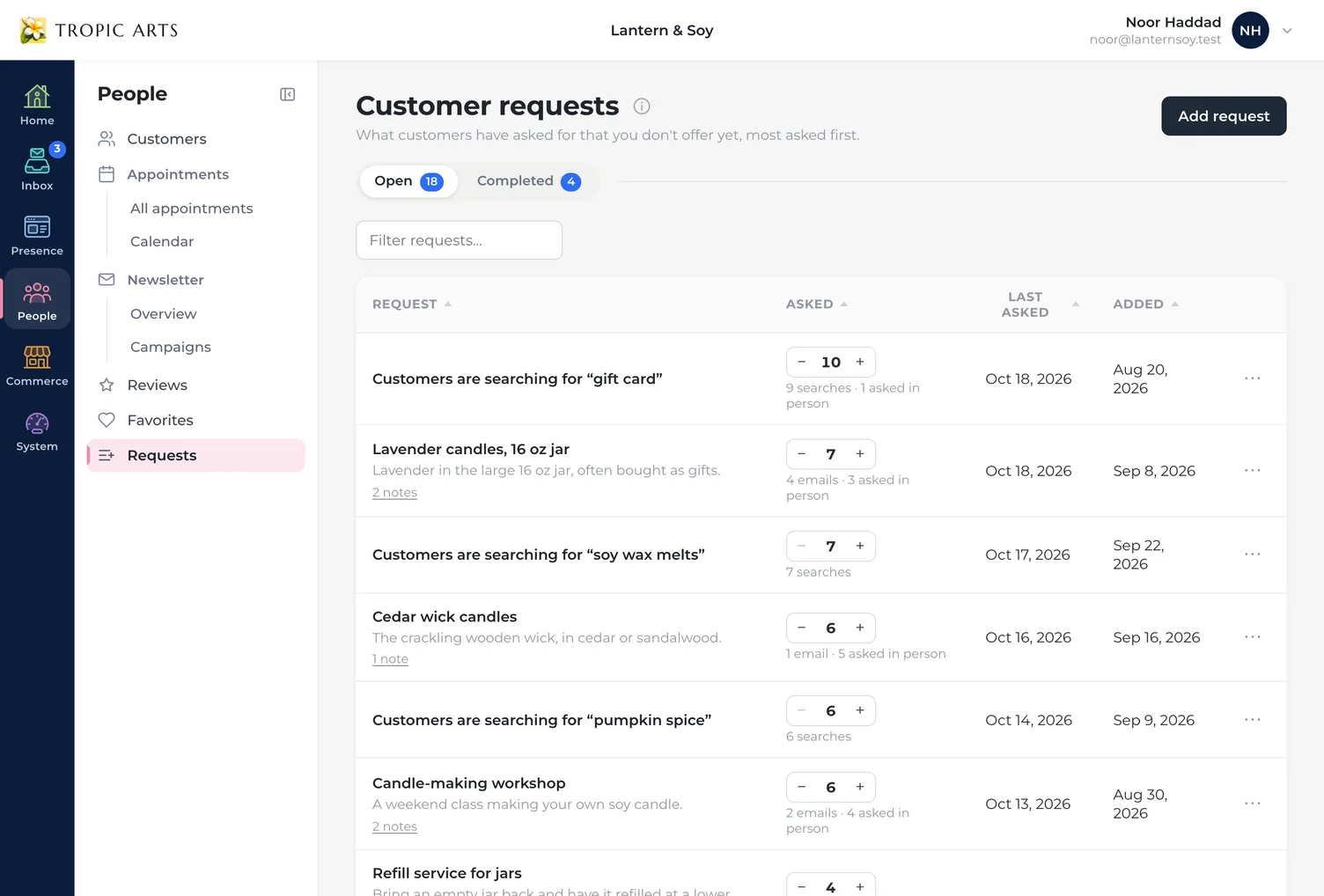
The Customer requests page in a candle shop's console, under People, with Open and Completed tabs over a list ranked by how often each thing was asked for: gift cards that customers searched for and couldn't find, then lavender candles in a 16 oz jar, each count between a minus and a plus and where its asks came from written under it.

From your inbox

One click turns an email into a request

When a customer writes in asking for something you don't carry, choose Add to Requests in the Inbox Assistant. AI reads the email and writes a short title for what they want, with a sentence about it. If that's already on your list, its count goes up by one; if not, it's added. Undo is right there, and so is Not the same? Add as new. The customer's name never goes to our AI provider, nothing is sent to the customer, and each one uses AI credits.
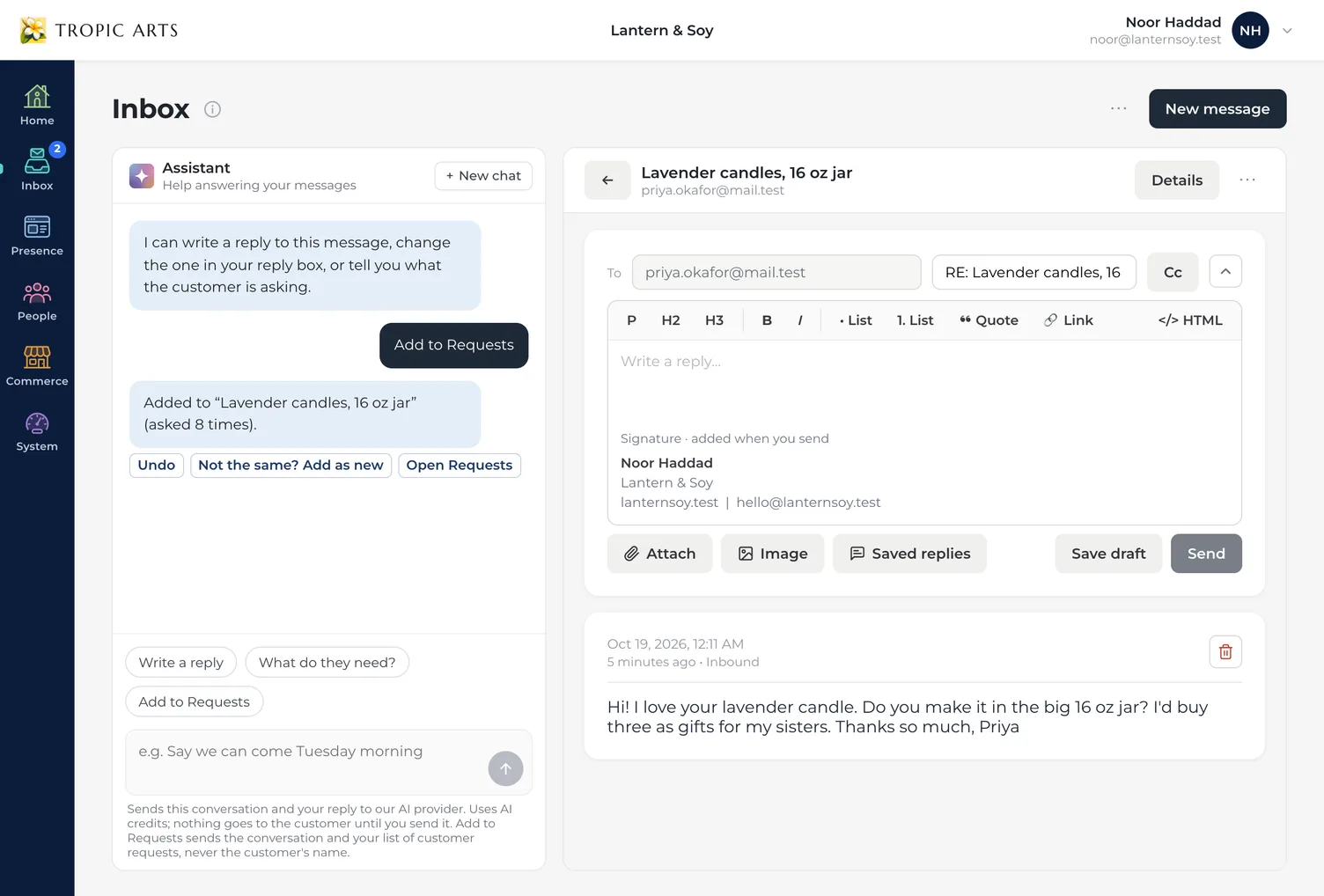
A customer's email in the Inbox asking whether a lavender candle comes in a 16 oz jar, beside the Assistant, where Add to Requests was chosen and answered: added to Lavender candles, 16 oz jar, now asked 8 times, with Undo, Not the same? Add as new, and Open Requests under it.

Work notes

Your team's notes stay with the request

Write down what you found out — a supplier's quote, a room that would work, a price idea — right on the request, with who wrote it and when. Merge two requests that turn out to be the same thing, and once you've added it, mark it complete. If customers keep asking after that, the list says so.
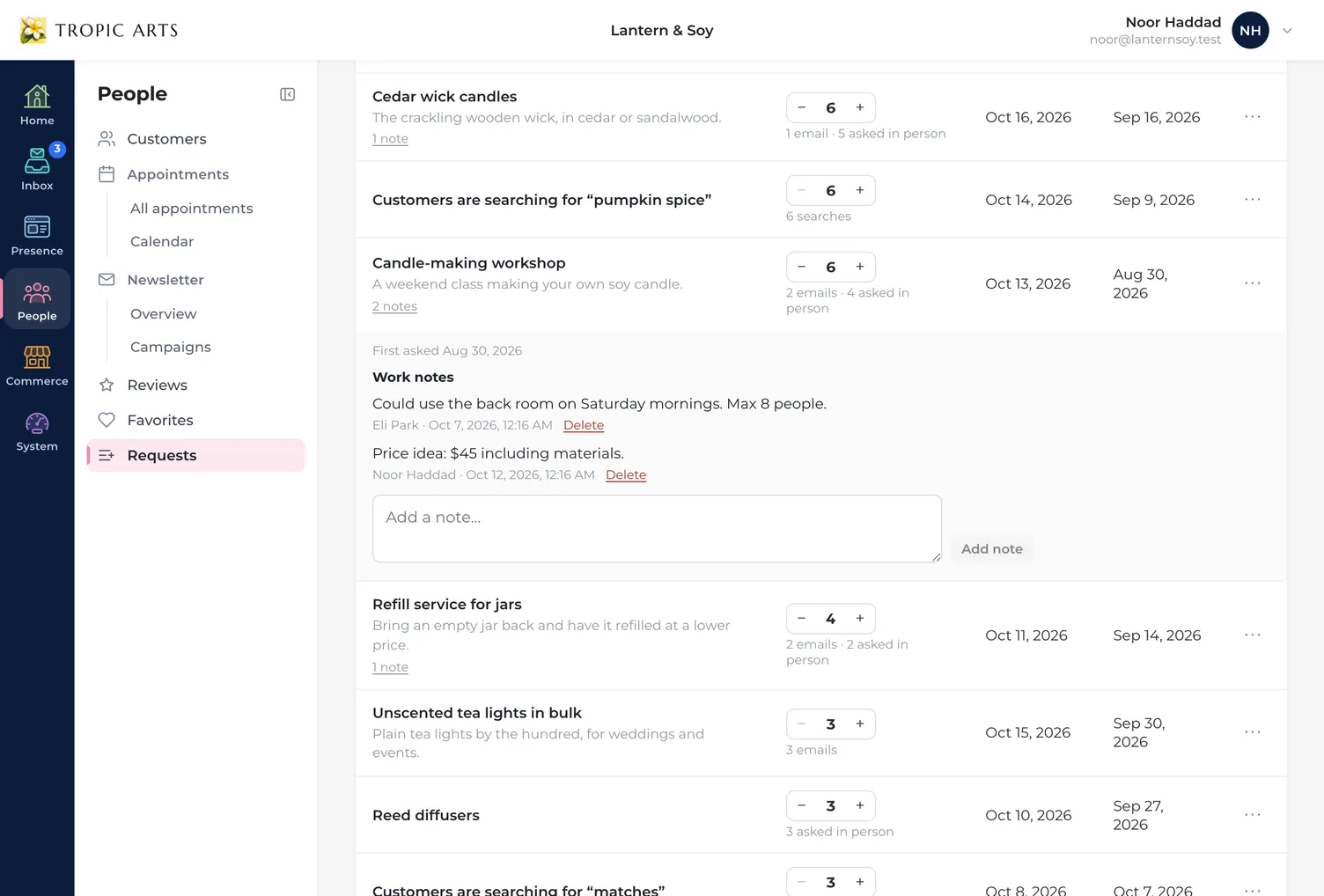
A request for a candle-making workshop opened on the list to show its work notes from two people on the team, one about using the back room on Saturday mornings and one with a price idea, above a box for adding another.

Three ways in, one list

01

Searches that found nothing

Each night, a search on your site that found nothing at least twice in 30 days is listed as Customers are searching for… or counted toward the request it matches. Searches that look like someone's details are never added.

02

Emails, in one click

Add to Requests in the Inbox Assistant reads the customer's email and files what they asked for. An email only ever counts once.

03

In person or on the phone

Add a request yourself, or press + on one that's already listed. Pressed it by mistake? − takes it back.

Everything Customer requests includes

The list, searches and asks in person work on every plan, free Trial included. Adding from email needs the Inbox, on paid plans, and uses AI credits.

Comes in from

  • ✓Emails, in one click
  • ✓Searches that found nothing
  • ✓Asks in person or by phone
  • ✓Requests you add yourself

The list

  • ✓Most asked first
  • ✓Open & Completed tabs
  • ✓Sort & filter
  • ✓Where each ask came from

Your team

  • ✓Work notes
  • ✓Mark complete & reopen
  • ✓Merge duplicates
  • ✓Asked again since completed

Privacy

  • ✓Never who asked
  • ✓No customer names sent to AI
  • ✓Nothing sent to your customer
  • ✓Undo right from the chat

Stock what they're already asking for

Start freeSee pricing
Logo

Build

  • AI website builder
  • AI logo designer
  • Website templates
  • Visual editor
  • Brand & style

Grow

  • Online store
  • Digital products
  • Subscriptions
  • Reviews & favorites
  • Bookings
  • Content & email
  • CRM
  • Customer requests
  • SEO & analytics

Foundations

  • Custom domains
  • Hosting & security
  • Site search
  • Locations

Company

  • About
  • Press kit
  • Websites for contractors
  • Websites for salons
  • Websites for restaurants
  • Online stores for makers
  • Pricing
  • Support
  • From the Studio
  • Contact
  • Log in
  • Start free

Legal

  • Accessibility Statement
  • Cookie Policy
  • DMCA Copyright Policy
  • Privacy Policy
  • Support Policy
  • Terms & Conditions
  • Report a Site
  • Typeface credits

Copyright © 2026 Tropic Arts. All rights reserved.

Butler Pro Typeface © Fabian De Smet www.fabiandesmet.com